Understanding Kubernetes Pods: The Building Blocks of Your Cloud-Native Applications

Introduction
In the previous article, we walked through how a Kubernetes cluster is structured: the control plane that thinks, the worker nodes that run the work, and the single path every request follows through them. We also left three questions hanging. Why wrap containers in a pod at all? Why not just schedule containers directly? And what does a pod actually share between its containers?
This article answers those questions. We’ll define what a pod is, look at why Kubernetes made the design choice to wrap containers in this extra layer, and see exactly what pods share and what they keep isolated. Then we’ll look at when you’d want more than one container in a pod versus the usual case of one, and finish by reading a minimal pod definition to see the shape on disk.
By the end, you’ll understand the pod as a design decision, not just a piece of Kubernetes vocabulary. That’s the foundation for everything that gets built on top of it in the rest of the series.
Let’s start with what a pod actually is.
What a Pod Is
A pod is the smallest thing Kubernetes schedules. When you ask Kubernetes to run an application, it doesn’t put a container on a node. It puts a pod on a node, and the pod contains one or more containers.
This is worth stopping on, because it’s the first thing that reframes what you learned in Part 1. The cluster we walked through schedules pods, not containers. The scheduler picks a node for a pod. The kubelet runs pods on its node. etcd stores pod definitions. The container runtime starts the containers inside a pod. Pods are the unit everything in Kubernetes operates on. Containers are what’s inside them.
The natural question is why. Why introduce a pod at all? Why not let Kubernetes schedule containers directly, the way you might have expected coming from Docker? That’s the next section.
Why the Wrapper Exists
The honest answer to “why wrap containers in a pod” starts with a fact Docker doesn’t really prepare you for: some containers genuinely need to run together.
Think about what it means for two containers to belong together. They might need to share a filesystem so one can write logs that the other ships off the node. They might need to reach each other over the network without going through external routing. They might need to start and stop as a unit, because one of them is useless without the other. They might need to end up on the same machine, because the whole point is that they’re cooperating closely.
If Kubernetes scheduled containers directly, handling these cases would be painful. You’d tell Kubernetes to run container A, then separately tell it to run container B, and then somehow tell it that A and B have to be on the same node, share a network, see the same files, and live or die together. Every piece of that coordination would be bolted on after the fact. And every component we met in Part 1 would need to know about this grouping: the scheduler would need special rules to co-locate them, the kubelet would need to know they’re related, etcd would need to track them as a group.
The pod makes the grouping a first-class idea instead. When you submit a pod, you’re not asking Kubernetes to run a container and then hoping it respects your constraints. You’re handing it one thing. That thing happens to contain one or more containers, but Kubernetes doesn’t schedule them separately and then stitch them together. It schedules the pod as a unit, and the containers inside are guaranteed to land on the same node, share the same network, and follow the same lifecycle. The hard parts of co-location are built into what a pod is.
This is why the wrapper exists even when it holds a single container. Most pods don’t need the shared network or the shared volume. But Kubernetes doesn’t have one system for “one container” and a separate system for “many containers”. It has one system, the pod, and it works the same way whether the pod holds one container or five. Simpler to build, simpler to reason about, simpler to use.
The next question is the concrete one. What does a pod actually share between its containers, and what does it keep isolated? That’s what the next section answers.
What a Pod Shares, What It Isolates
The reason a pod can group containers tightly is that it gives them things to share. Two in particular: a network and, if you ask for it, storage.
The Shared Network
Every pod gets its own IP address in the cluster. That IP belongs to the pod, not to any one container inside it. If a pod has three containers, all three share the same IP.
They also share the same network namespace, which means they share the same set of ports. A process listening on port 8080 inside one container is reachable at localhost:8080 from every other container in the same pod. No service discovery, no internal routing, no DNS lookup. They just talk to each other over localhost as if they were running on the same machine. From a network perspective, they are.
This is what makes tight coupling cheap. A container that needs to talk to another container in the same pod doesn’t have to go through the cluster network. It doesn’t even need to know the other container’s name. localhost and the right port is enough.
The flip side is that containers in the same pod can’t both listen on the same port. If one container uses port 8080, another container in the same pod can’t. They’re sharing one network namespace, so they share one set of ports. This rarely matters in practice, because you’re usually combining containers that do different things, but it’s the constraint that comes with the sharing.
Shared Storage
Containers in a pod don’t share a filesystem by default. Each container has its own filesystem, isolated from the others, which is the normal container behaviour you’re used to from Docker.
What you can do is declare a volume at the pod level and mount it into more than one container. The volume belongs to the pod, and any container that mounts it sees the same files. One container can write a file, and another container can read it.
The classic case is logs. One container produces log files as it runs. Another container, a sidecar, reads those log files and ships them somewhere else, to a central logging system, a cloud storage bucket, wherever. The main container doesn’t need to know anything about log shipping. The sidecar doesn’t need to know anything about what the main container does. They just agree on a directory in a shared volume, and the filesystem handles the rest.
Seeing Both Together
Here’s the nginx and log-shipper pattern as a single pod.
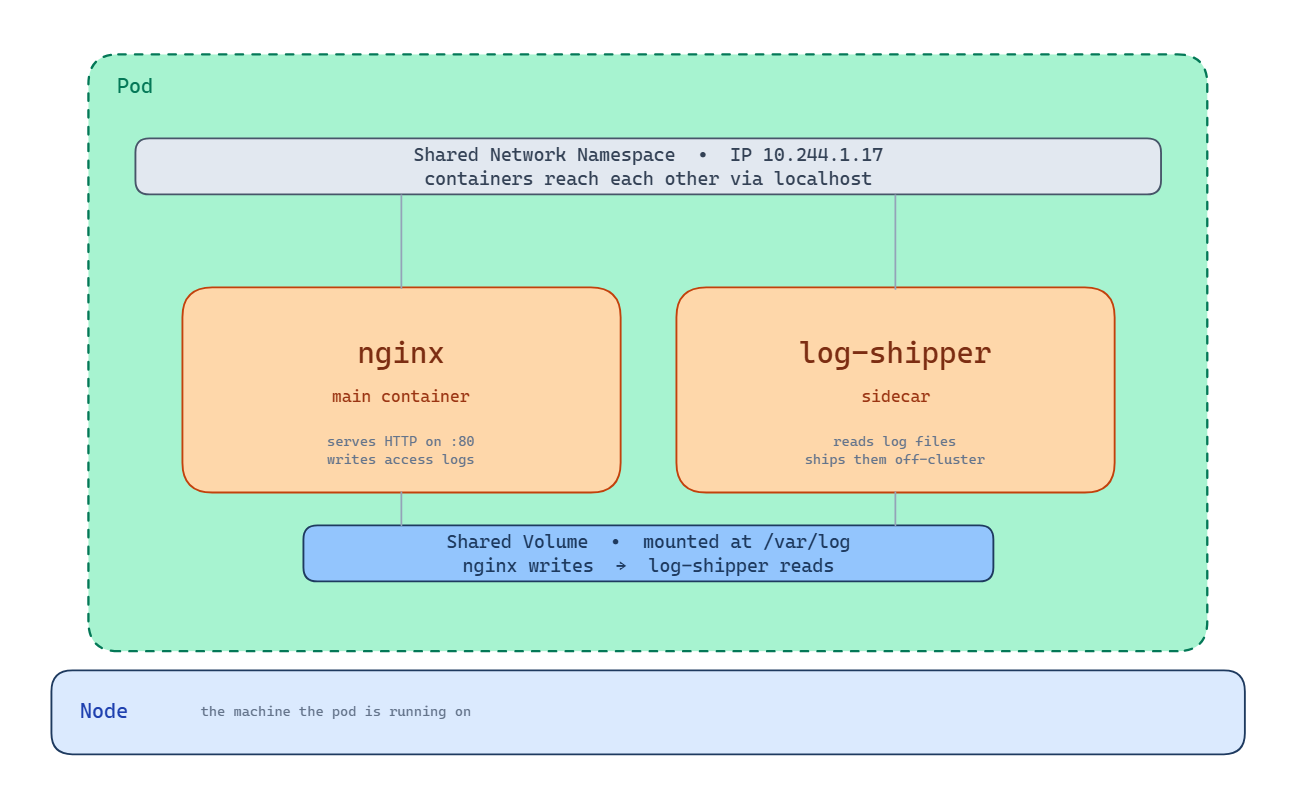
The green boundary is the pod itself. Inside it, two containers: nginx serving HTTP on port 80 and writing access logs to disk, and log-shipper reading those logs and sending them off-cluster. Above both containers, the shared network namespace with a single IP address. Both containers can be reached from outside through that IP. Inside the pod, they reach each other over localhost. Below both containers, the shared volume mounted at /var/log. nginx writes to it, log-shipper reads from it. The whole pod lives on one node, shown by the bar underneath.
What the Pod Doesn’t Share
Outside the network and the mounted volumes, the containers are still isolated. Each one has its own filesystem for everything except the shared volumes, its own set of processes, and its own memory space. If you open a shell in one container, you don’t see the processes running in the other container. If one container crashes, Kubernetes restarts just that container, the others keep running.
This is the boundary that matters. The pod couples its containers on network and storage, but keeps them isolated everywhere else.
Which raises the question: when would you actually want more than one container in a pod? The rule of thumb is straightforward. If two containers could run independently and still do their jobs, they should be separate pods. Separate pods can be scaled independently, updated independently, and moved to different nodes. Putting them in one pod gives that up.
You reach for a multi-container pod when the containers genuinely can’t function apart, when one needs the other’s network or storage so directly that coordinating them as separate pods would be harder than coupling them at the pod level. That’s the case the nginx and log-shipper example showed. Most of the time, a single container is the right answer.
Now we’ve covered what a pod is conceptually. Let’s look at what one actually looks like when you write it down.
A Pod in YAML
So far we’ve talked about what a pod is and what it does. Here’s what one actually looks like when you write it down.
Kubernetes resources are described in YAML. You write a file that says what you want to exist, hand it to the cluster, and the cluster makes it real. Here’s the simplest pod definition possible: a single nginx container.
apiVersion: v1
kind: Pod
metadata:
  name: my-nginx
  labels:
    app: web
spec:
  containers:
    - name: nginx
      image: nginx:1.27
      ports:
        - containerPort: 80
Every Kubernetes resource has the same four top-level fields, and it’s worth knowing what each one does.
apiVersion tells Kubernetes which version of the API this resource is written against. For pods, it’s v1, which has been stable for years.
kind says what kind of resource you’re describing. Here, a Pod. Later in the series you’ll meet ReplicaSet, Deployment, Service, and others, each with its own kind.
metadata holds information about the resource itself, separate from what it does. The name uniquely identifies this pod inside its namespace. The labels are key-value tags you attach for your own organisation, or for other Kubernetes resources to find this pod by. We’ll see labels do real work when we get to ReplicaSets.
spec is where you describe what you actually want. For a pod, that’s the list of containers. Each container needs at least a name and an image. This one also declares that it listens on port 80, which is useful information for anything that wants to reach it.
You hand this file to Kubernetes with kubectl:
kubectl apply -f my-nginx.yamlFrom there, the path we traced in the previous article takes over. The API server validates the request and stores it in etcd. The scheduler picks a node. The kubelet on that node asks the container runtime to pull the nginx image and start the container. A few seconds later, your pod is running.
You don’t need to memorise the shape of a pod spec. You’ll see it often enough that it becomes familiar. What’s worth recognising is that every Kubernetes resource follows the same four-field structure: apiVersion, kind, metadata, spec. Once you know the shape, every new resource type is just a variation on it.
Where This Leads
You now have a working understanding of pods. The smallest thing Kubernetes schedules, a wrapper that groups one or more containers and shares a network and optional storage between them. The unit the whole cluster operates on.
There’s one thing about pods worth facing honestly before we move on, and it’s the reason you almost never create pods directly in production.
A pod on its own is fragile. If the node it’s running on fails, the pod goes with it and nothing brings it back. If you want more than one copy of your application running, you have to create each pod yourself. If you want to update your application, you have to delete the old pods and create new ones by hand. Pods are the unit Kubernetes schedules, but on their own, they don’t give you any of the reliability guarantees that made Kubernetes interesting in the first place.
The answer is to not create pods directly. You create something that creates pods for you, watches them, and replaces them when they fail. Something that lets you say “I want three copies of this pod running” and makes sure that stays true, even as nodes come and go.
That something is called a ReplicaSet, and it’s the next article. Everything you’ve learned about pods still applies. ReplicaSets don’t replace pods, they manage them.