Kubernetes Networking Explained: Pods, CNI, and Overlay Networks Demystified

Introduction
In Docker, networking is relatively straightforward, containers run on a single machine and communicate over a local bridge network. If you’ve been following along from our Docker networking article, you’ve already seen how that works.
Kubernetes changes the picture. Your containers now run inside pods, those pods are spread across multiple nodes, and everything is constantly starting, stopping, scaling, and moving. The question becomes: how does all of this communicate reliably?
That’s what this article is about. We’re going to walk through how Kubernetes networking works, from how containers talk inside a pod, to how pods communicate across nodes, to the system-level design choices that make it all possible. By the end, you’ll understand the flat network model, why Kubernetes eliminates NAT, how CNI plugins and overlay networks fit together, and why this architecture scales the way it does.
Let’s start with the fundamentals.
Why Kubernetes Networking Is Different
In traditional infrastructure, networking is relatively predictable. Applications run on servers (physical or virtual) with fixed IP addresses. You know where things live. If your web server is at 192.168.1.10 and your database is at 192.168.1.20, that’s where they stay. The network is stable because the infrastructure is stable.
Kubernetes changes that in some fundamental ways.
Applications no longer run directly on servers. They run in containers, grouped inside pods, scheduled across a pool of nodes. And none of it stays still. Pods are created and destroyed constantly. A rolling update replaces your pods with new ones. An autoscaler spins up ten more pods because traffic spiked. A node runs out of memory and Kubernetes reschedules its workloads somewhere else. Each time any of this happens, IP addresses are assigned and reclaimed.
This is the core challenge: in a system where everything is ephemeral and constantly moving, how do workloads find and talk to each other reliably?
Traditional networking was not designed for this. It assumes stable endpoints. Kubernetes needs a networking model that works when nothing is stable, when pods appear and disappear across nodes, when IPs change without warning, and when the cluster itself grows and shrinks on demand.
That’s exactly what Kubernetes networking was built to solve. It provides a set of design choices that absorb all of this complexity so your applications don’t have to deal with it.
We’ll work through those design choices layer by layer, starting with the simplest case: how containers communicate inside a single pod.
Inside a Pod: How Containers Communicate
The simplest networking scenario in Kubernetes happens inside a single pod.
A pod is a wrapper around one or more containers that need to run together on the same node. These containers share the same lifecycle, the same IP address, and the same network namespace. From a networking perspective, they behave like processes running on the same machine.
That means containers inside the same pod communicate over localhost. This is commonly seen in the sidecar pattern, where a main application container is paired with a helper that handles concerns like logging, proxying, or configuration. For example, if a web server runs on port 80 and a logging sidecar runs on port 8081, the web server sends logs to localhost:8081 and the sidecar receives them instantly. No routing, no NAT, no network configuration. They share the same network identity, so coordination is simple and fast.
But most applications aren’t just one pod. A frontend needs to talk to a backend. A backend needs to reach a database. These are different pods, often running on different nodes entirely. And since pods are constantly being created and destroyed, their IP addresses change every time.
That raises a harder question: how do pods communicate with each other across a cluster where nothing stays in the same place?
Pod-to-Pod Communication: The Flat Network Model
Inside a pod, containers talk over localhost. But in a real cluster, pods need to reach other pods, and those pods are often running on completely different nodes.
Kubernetes solves this with a design choice called the flat network model. The idea is straightforward: every pod in the cluster gets its own unique IP address, and every pod can reach every other pod directly using that IP. No port mapping, no routing gymnastics, no translation layers. From any pod’s perspective, every other pod looks like it’s on the same network.
How It Looks in Practice
The diagram below shows four pods running across two nodes. Pod 1 and Pod 2 are on Node 1 (blue). Pod 3 and Pod 4 are on Node 2 (green). Each pod has its own IP in the same address range (10.10.1.x), even though they’re on different physical machines.
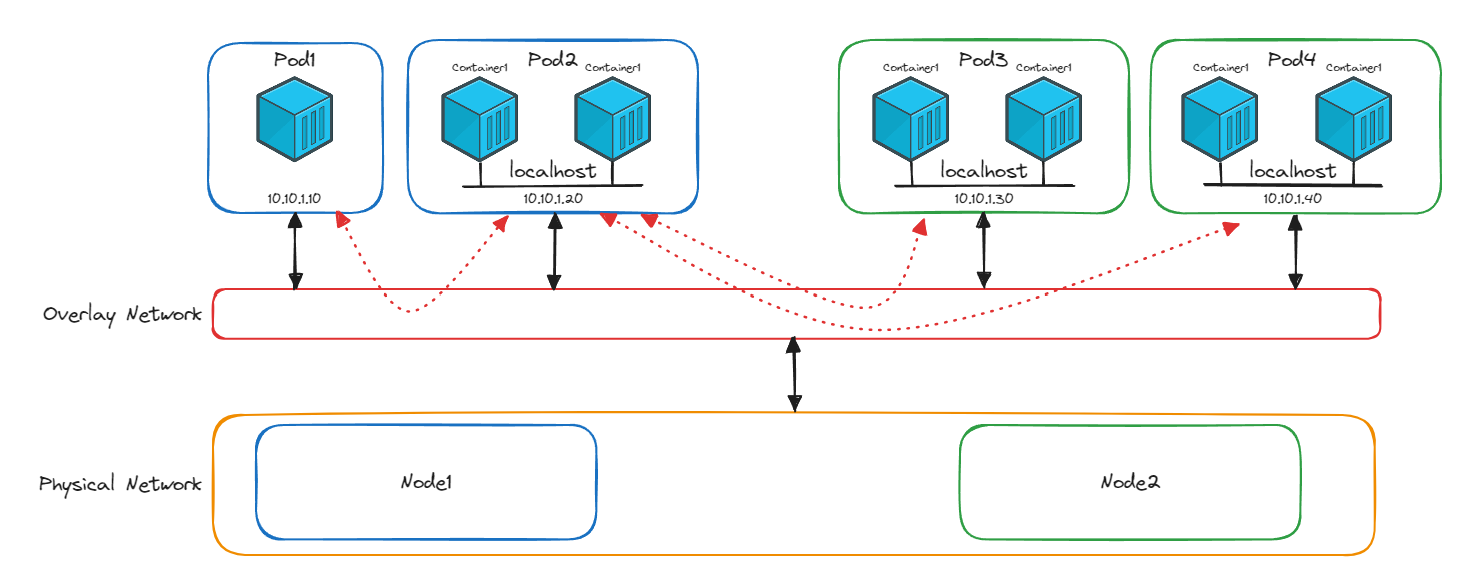
When Pod 2 on Node 1 needs to talk to Pod 3 on Node 2, it sends traffic directly to 10.10.1.30. It doesn’t need to know that Pod 3 is on a different node. The physical separation is invisible.
You’ll notice a red layer in the diagram sitting between the pods and the physical network. That’s the overlay network, and it’s what makes this cross-node communication possible. We’ll unpack how it works in the next section. For now, the important thing is what it enables: pods talk directly to each other using real IP addresses, regardless of which node they’re on.
Why Kubernetes Avoids NAT
If you’ve worked with traditional networking, you might be wondering: why not just use NAT?
To understand why Kubernetes avoids it, it helps to know what NAT actually does. In your home network, every device (your phone, laptop, TV) gets a private IP address like 192.168.1.x. These addresses only work inside your home. When any device needs to reach the internet, your router steps in and rewrites the source address, replacing your device’s private IP with your home’s single public IP. When the response comes back, the router checks a translation table to figure out which device the traffic belongs to, rewrites the destination address back, and forwards it along.
This works well for home networks because the pool of public IPv4 addresses is limited. Instead of every device in every household needing its own public IP, all your devices share one. NAT makes that possible by translating between private and public addresses, and keeping a table of which internal device is behind each connection.
Now imagine applying that model inside a Kubernetes cluster. A frontend pod needs to reach an order processing pod. With NAT in the picture:
- The frontend pod’s IP would be rewritten every time it sends traffic
- Every node would need NAT tables mapping translated addresses back to real pod IPs
- When pods are destroyed and recreated (which happens constantly), those NAT tables need continuous updates
- Debugging becomes painful because the source IP in your logs isn’t the IP that actually sent the traffic. You’re chasing phantom addresses through translation layers
In a system where pods are ephemeral and IPs change all the time, NAT adds overhead, complexity, and fragility at exactly the wrong moment.
Kubernetes takes a cleaner approach. Every pod gets a real, routable IP address that works across the entire cluster. Traffic flows directly between pods with no rewriting and no translation state. The IP you see is the IP that sent the packet.
What Happens When Pod IPs Change?
Pod IPs are temporary. When a pod is destroyed and recreated during a rolling update, a scaling event, or a node failure, it comes back with a new IP address.
This sounds like it would break things, but Kubernetes handles it through internal DNS.
Here’s how it works. Say you have a frontend service and an order processing service. The frontend doesn’t call the order processing pods by their IP addresses directly. Instead, it uses a DNS name like:
orderservice.default.svc.cluster.localBehind that name, Kubernetes maintains a mapping to the current pod IPs for that service. When one of the order processing pods is replaced and gets a new IP, Kubernetes updates the DNS record. The next time the frontend looks up orderservice, it gets the new IP. The frontend code never changes, never tracks IPs, and never breaks because a pod restarted.
This is also why pods within the same service don’t need to communicate with each other. If you have three pods behind the orderservice DNS name, those three pods are replicas of the same workload. They exist to share load, not to coordinate with each other. The communication pattern is always between services: the frontend calls the order service by name, DNS resolves to one of the current pods, and the connection happens.
The Model Kubernetes Promises
Every pod gets its own IP. Every pod can reach every other pod directly. No NAT, no port mapping, no manual routing. Add new nodes and their pods automatically join the same network. Scale up, scale down, reschedule workloads, and communication keeps working. DNS handles the ephemeral nature of pod IPs so your application code doesn’t have to.
This is the networking contract that Kubernetes guarantees. But Kubernetes itself doesn’t implement any of it. It doesn’t assign IPs, it doesn’t build the overlay network, and it doesn’t handle packet routing between nodes.
That job belongs to something else entirely. It’s called the Container Network Interface, and it’s one of Kubernetes’ most important architectural decisions.
CNI Plugins and Overlay Networks: How It Actually Works
Kubernetes guarantees that every pod gets a real IP and can reach every other pod directly. But Kubernetes doesn’t do any of the networking work itself. It doesn’t assign IP addresses, it doesn’t configure routing, and it doesn’t build the network that connects pods across nodes.
Instead, Kubernetes delegates all of that to something called the Container Network Interface (CNI). CNI is a standardised contract. When Kubernetes creates a pod, it calls a CNI plugin to handle the networking: assign the pod an IP, configure its network namespace, and connect it to the cluster network. When the pod is deleted, the CNI plugin cleans up.
This design follows one of Kubernetes’ core architectural principles: separation of concerns. Kubernetes handles orchestration (scheduling, scaling, lifecycle). The CNI plugin handles networking. Each focuses on its job, and together they scale.
Why a Plugin Model?
By using a standard interface, Kubernetes stays flexible. Networking experts build specialised solutions. Users choose the one that fits their needs. And Kubernetes never has to reinvent the wheel.
There are many CNI plugins available, each with different strengths:
- Calico: Policy-driven networking with strong security enforcement
- Flannel: Lightweight overlay networking, well suited for simpler clusters
- Cilium: High-performance networking powered by eBPF, with deep observability and advanced security
All of them implement the same CNI contract, which means they all plug into Kubernetes the same way. The cluster doesn’t care which one you choose, as long as it fulfils the contract: assign IPs, enable pod-to-pod communication, and make the flat network model real.
The Overlay Network: Making the Flat Model Real
So how does a CNI plugin actually connect pods across different nodes?
This is where the overlay network comes in. Look at the diagram from the previous section again. The red layer sitting between the pods and the physical network is the overlay. It creates a virtual network on top of the physical infrastructure, making pods on different nodes appear as if they’re on the same network.
Here’s what happens step by step when Pod 2 on Node 1 sends traffic to Pod 3 on Node 2:
- Pod 2 sends a packet addressed to
10.10.1.30(Pod 3’s IP) - The packet reaches the CNI plugin on Node 1
- The plugin wraps this packet inside a new packet. The inner packet still says “from Pod 2, to Pod 3.” The outer packet says “from Node 1, to Node 2.” This wrapping is called IP encapsulation
- The outer packet travels across the physical network to Node 2
- The CNI plugin on Node 2 receives it, strips off the outer layer, and delivers the original packet to Pod 3
- Pod 3 sees a packet from
10.10.1.20and has no idea it crossed a physical network boundary
The reply follows the same process in reverse.
This is what makes the flat network model more than just a concept. The overlay network, managed by the CNI plugin, handles all the wrapping, routing, and unwrapping behind the scenes. Every pod sends and receives traffic using real pod IPs. The physical network topology is completely hidden.
What the CNI Plugin Actually Manages
To make all of this work, the CNI plugin handles several responsibilities:
- IP address assignment: each pod gets a unique, cluster-wide IP from a managed address pool
- Network namespace configuration: each pod gets its own isolated network stack
- Overlay tunnel management: building and maintaining the virtual network between nodes
- Packet encapsulation and decapsulation: wrapping and unwrapping traffic as it crosses node boundaries
- Routing: making sure traffic reaches the right node and the right pod
All of this happens transparently. Your application code sends traffic to a service DNS name. The CNI plugin takes care of everything between the send and the receive.
This is the final piece that ties the whole system together. Kubernetes defines the networking contract. The CNI plugin fulfils it. And the overlay network is how it delivers on the promise of a flat, NAT-free, location-independent network.
Conclusion
We started with a simple question: in a system where everything is ephemeral and constantly moving, how do workloads find and talk to each other?
Kubernetes answers that through a set of layered design choices. Containers inside a pod share a network namespace and communicate over localhost. Pods get their own cluster-wide IP addresses and talk to each other directly through a flat network model with no NAT. DNS keeps track of changing pod IPs so services can find each other by name. And CNI plugins handle all of the underlying work: assigning IPs, building overlay networks, and routing traffic transparently across nodes.
Each layer solves one problem and creates the foundation for the next. Together, they give you a networking model where your application code doesn’t need to know where anything is running, how many replicas exist, or which node a pod landed on. It just calls a name and connects.
But connectivity is only half the story. Right now, every pod in the cluster can reach every other pod. There are no restrictions, no boundaries, and no access controls. In a production environment, that’s a problem.
In the next article, we’ll look at how Kubernetes Network Policies let you define exactly which pods can communicate with which, turning an open network into a controlled one.