Docker for Beginners: Understanding Containerd, CRI-O, and the Runtime Layer

Introduction: What Actually Runs a Container?
So far, we have looked at Docker from the developer side.
You have learned how images package application environments, how containers run from images, how Dockerfiles create images, how registries share images, how containers connect through networks, and how data can survive through volumes and bind mounts.
That gives you a strong working model of Docker.
But there is still one layer underneath the Docker experience.
When you type a command like:
docker run nginxDocker gives you a simple interface. It accepts the command, finds the image, creates the container, and starts the application.
But Docker is not doing every layer of that work by itself.
Underneath the Docker command-line experience, there are runtime components that prepare, create, and start the actual container process.
Those runtime components matter for Docker, but they also matter for something bigger: portability.
Docker is not the only place containers run.
The same kind of container image can be run by Docker on your machine, by Docker Compose as part of a local multi-container app, by cloud services such as Azure Container Apps, and by Kubernetes in a cluster.
That raises an important question:
If these platforms are different,
how can they all run the same kind of container image?
The answer is that the container world has shared runtime layers and standards underneath the tools we use day to day.
Docker gives us the developer-friendly experience, but underneath that experience are runtime components that prepare images, create containers, and start isolated processes on a host.
In this article, we will go one layer deeper.
We will look at the runtime chain behind a container:
docker run
→ Docker Engine
→ containerd
→ runc
→ Linux kernel features
→ running container process
Then we will connect that chain to the wider container ecosystem. We will see why platforms such as Kubernetes care about container runtimes, where CRI-O fits, and why the same container image can move across different tools and platforms.
This article is a crossroads.
Once you understand the runtime layer, Docker connects to two useful paths.
One path goes deeper into orchestration with Kubernetes.
The other path stays practical with Docker itself: running multi-container applications locally with Docker Compose, then taking that idea into cloud services such as Azure Container Apps.
So the goal here is not to turn you into a runtime engineer.
The goal is simpler:
Understand what sits underneath Docker,
and why containers can run across different tools and platforms.
That small change makes the later Kubernetes/CRI-O section feel earned, not sudden.
The Layer Under Docker
Docker gives you a friendly way to work with containers.
You type commands like:
docker run nginx
docker build -t my-app .
docker ps
Those commands are simple, but they sit on top of several lower-level responsibilities.
Something has to pull images.
Something has to store those images locally.
Something has to create containers from those images.
Something has to start and stop the container process.
Something has to apply resource limits, connect storage, and ask the operating system for isolation.
That is the runtime layer.
The diagram below shows the basic idea.
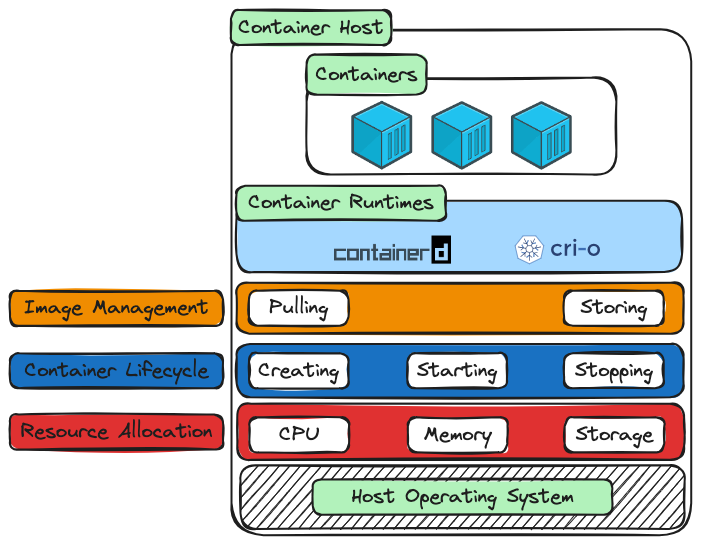
At the top, you have containers running on a container host.
Underneath that, you have container runtimes such as containerd and CRI-O.
Those runtimes help with the work required to run containers, including:
Image management
→ pulling and storing images

Container lifecycle
→ creating, starting, and stopping containers

Resource allocation
→ CPU, memory, and storage
At the bottom, you still have the host operating system. Containers are not magic. They rely on the host operating system and its isolation features to run as separated processes.
That is the first important shift in this article.
Docker is the tool most developers meet first, but Docker is part of a wider container stack.
When you run a container, Docker gives you the experience at the top. Runtime components underneath help turn that request into a real running process on the host.
What a Container Runtime Does
Now that we have named the layer underneath Docker, let’s define it more clearly.
A container runtime is the part of the container stack responsible for running containers on a host.
That sounds simple, but “running a container” includes several jobs.
A runtime may need to:
Pull or prepare an image
Unpack the image layers
Create the container filesystem
Prepare networking and storage attachments
Apply CPU and memory settings
Start the container process
Stop or remove the container later
In other words, a container runtime turns the idea of a container into an actual running process on the machine.
That is an important point.
A container is not a tiny virtual machine. It is a process running on the host, with isolation around it. The runtime helps create that isolated process using operating system features.
On Linux, that usually involves features such as namespaces and cgroups.
Namespaces help separate what the process can see, such as processes, networking, and filesystems.
Cgroups help control what the process can use, such as CPU and memory.
You do not need to master those kernel details in this article. The important idea is simpler:
The runtime prepares the container environment,
then starts the application process inside that environment.
That is why the runtime layer matters.
Docker gives you the command-line experience, but runtime components help do the lower-level work that makes the container real.
The Runtime Chain: Docker Engine, containerd, and runc
Now let’s connect this back to the command developers usually see:
docker run nginxWhen you run that command, Docker gives you the friendly top-level experience. It accepts the command, finds the image, creates the container, and starts the application.
But underneath that simple command, the work is split across layers.
A simplified chain looks like this:
docker run
→ Docker Engine
→ containerd
→ runc
→ Linux kernel features
→ running container process
Let’s walk through that chain.
Docker Engine is the part most developers think of as “Docker.” It provides the Docker API and the familiar Docker commands. When you run docker run, Docker Engine receives the request and coordinates the work.
containerd is a high-level container runtime. It manages container lifecycle tasks such as pulling images, storing images, creating containers, starting containers, and tracking their state. Docker uses containerd underneath.
runc is a low-level container runtime. Its job is much closer to the operating system. It creates the actual container process using Linux isolation features.
So the split is roughly:
Docker Engine → developer-facing control layer
containerd    → manages container lifecycle
runc          → starts the isolated container process
Linux kernel  → provides isolation and resource controls
That is why people sometimes say Docker does not “directly” run the container by itself.
That sentence can sound strange at first, because from your point of view you typed a Docker command and a container started. That is true. Docker started the workflow.
But Docker delegates lower-level runtime work to components underneath it.
The important idea is not that Docker is unimportant. Docker is extremely important because it gives developers a simple, usable interface for building and running containers.
The important idea is that Docker sits on top of a runtime stack.
So when you run a container, the model is:
You ask Docker to run something.
Docker coordinates the request.
containerd manages the container lifecycle.
runc creates the actual isolated process.
The host operating system provides the isolation features.
That is the runtime chain behind the simple command.
How This Connects to Kubernetes and Other Platforms
Now that the runtime chain is clear, the bigger container ecosystem starts to make more sense.
Docker gave developers a friendly way to build and run containers. That was a huge part of why containers became so widely used.
But containers became bigger than Docker alone.
The same container image might be run by Docker on your laptop, Docker Compose in a local multi-container setup, Azure Container Apps in the cloud, or Kubernetes in a cluster.
That only works because there are common layers and interfaces underneath.
Kubernetes is a good example.
Kubernetes is an orchestrator. Its job is to decide what should run, where it should run, how many copies should exist, and what should happen when something fails.
But Kubernetes does not want to personally implement every low-level detail of running a container.
It does not need to be the tool that directly unpacks image layers, creates container filesystems, starts isolated Linux processes, or manages every runtime detail itself.
Instead, Kubernetes defines what it needs from a container runtime and lets runtime implementations do that work.
That connection is called the Container Runtime Interface, or CRI.
The CRI gives Kubernetes a standard way to talk to container runtimes. A runtime that supports the CRI can be used by Kubernetes to:
Pull images
Create containers
Start containers
Stop containers
Report container status
This is where containerd and CRI-O fit in.
containerd is used underneath Docker, but it can also be used directly by Kubernetes through CRI support.
CRI-O was built specifically for Kubernetes. Its name points to its purpose: CRI plus OCI. It implements the Kubernetes runtime interface and uses OCI-compatible runtimes, such as runc, to create the actual container process.
So the practical picture is:
Docker
→ uses containerd
→ uses runc underneath

Kubernetes
→ can use containerd
→ can also use CRI-O
→ still relies on low-level runtimes such as runc underneath
That is why the same container image can move across platforms.
The image you build with Docker is not only useful to Docker. You can push it to a registry, and other platforms can pull and run it because they understand the same container image format and have compatible runtime layers underneath.
That is the wider point of this article.
Docker is the developer-friendly starting point, but containers are part of a larger ecosystem:
Docker locally
Docker Compose locally
Azure container services in the cloud
Kubernetes clusters
Different platforms give you different ways to schedule, configure, scale, and operate containers. But underneath, they all depend on the same basic idea:
A container image can be pulled, unpacked, and run as an isolated process on a host.The Container Runtime Mental Model
At this point, the runtime layer should feel less mysterious.
When you run a container, Docker gives you the developer-friendly experience:
docker run nginxBut underneath that command is a chain of responsibility.
Docker Engine accepts and coordinates the request.
containerd manages the container lifecycle.
runc creates the isolated container process.
The host operating system provides the isolation and resource controls that make the process behave like a container.
So the simplified model is:
Docker Engine
→ coordinates the developer-facing container workflow

containerd
→ manages images and container lifecycle

runc
→ creates the isolated container process

Host operating system
→ provides isolation and resource controls
That explains what happens under Docker.
It also explains why containers are bigger than Docker alone.
The image you build with Docker can be pushed to a registry and run somewhere else because other platforms understand the same container image format and have compatible runtime layers underneath.
So the wider model looks like this:
Docker locally
Docker Compose locally
Azure Container Apps in the cloud
Kubernetes in a cluster
Those platforms are different, but they all rely on the same basic container idea:
Pull an image.
Prepare the container environment.
Start an isolated process on a host.
Manage that process over time.
That is the key mental model.
Docker is the tool most developers meet first. It gives containers a friendly workflow.
The runtime layer is what makes that workflow portable across the wider container ecosystem.
Where This Leads
You now understand the layer underneath Docker.
Docker gave us the friendly developer workflow:
docker run
docker build
docker ps
docker volume create
But underneath that workflow, container runtimes help turn images into running processes on a host.
That matters because containers are not limited to one tool.
The same image can move through different environments:
Docker on your machine
→ Docker Compose for local multi-container apps
→ Azure Container Apps in the cloud
→ Kubernetes in a cluster
Each platform gives you a different level of control.
Docker is excellent for building, running, and testing containers locally.
Docker Compose is useful when your application has multiple containers that need to run together, such as a web app, API, database, and cache.
Azure Container Apps gives you a cloud-native way to run containerized services without managing servers or a Kubernetes cluster directly.
Kubernetes gives you a full orchestration platform for scheduling, scaling, healing, and operating containers across a cluster.
The important point is that these are not disconnected worlds.
They all build on the same container idea:
Package the application as an image.
Store the image in a registry.
Run the image as an isolated process on a host.
Use a platform to manage how that process runs.
That is why this runtime article matters. It gives you the bridge between the Docker commands you use as a developer and the wider container platforms you will meet later.
In the next article, we will stay practical and bring several Docker ideas together with Docker Compose.
So far, we have learned images, containers, networking, and storage as separate pieces.
Next, we will use Compose to describe a multi-container application in one file and run the whole stack locally.