Dapr for Beginners: Building Your First Dapr Microservices App


Introduction: From Dapr Concepts to a Working App
In the previous article, we looked at why microservices can become painful.
Splitting one application into smaller services can give you independent deployments, clearer ownership, and more flexibility. But it also creates distributed-system problems. Services need to call each other, store state, handle retries, emit telemetry, read secrets, and connect to infrastructure.
That is where Dapr comes in.
Dapr gives your services a consistent runtime API for common distributed-system capabilities. Your application talks to its local Dapr sidecar, and Dapr talks to the infrastructure behind it.
In this article, we will move from the idea to a working example.
We will build a small two-service application:
Order Service
→ calls Inventory Service through Dapr service invocation

Inventory Service
→ stores inventory quantities through Dapr state management
This example uses two Dapr building blocks:
Service invocation
→ one service calls another by app ID

State management
→ one service stores and retrieves state through Dapr
The services will be intentionally simple.
The point is not to build a full e-commerce platform. The point is to prove the Dapr model with real code:
Your service
→ talks to its local Dapr sidecar
→ uses a Dapr building block
→ reaches another service or backing store
By the end, you will have two services running locally with Dapr sidecars. The Order Service will place an order by calling the Inventory Service. The Inventory Service will store and update inventory through Dapr’s state API.
That is the first practical step toward building distributed applications the Dapr way.
What We Are Building
We will build a small microservices application with two services:
Order Service
→ receives an order request
→ calls the Inventory Service through Dapr

Inventory Service
→ stores product quantities
→ uses Dapr state management
The application flow is simple.
First, we add stock for an item:
item1
→ quantity: 100
Then we place an order for part of that stock:
Order 10 units of item1The Order Service will call the Inventory Service to check the available quantity. If enough stock exists, it will ask the Inventory Service to reduce the quantity.
After the order is placed, the inventory should drop:
item1
→ quantity: 90
The architecture looks like this:
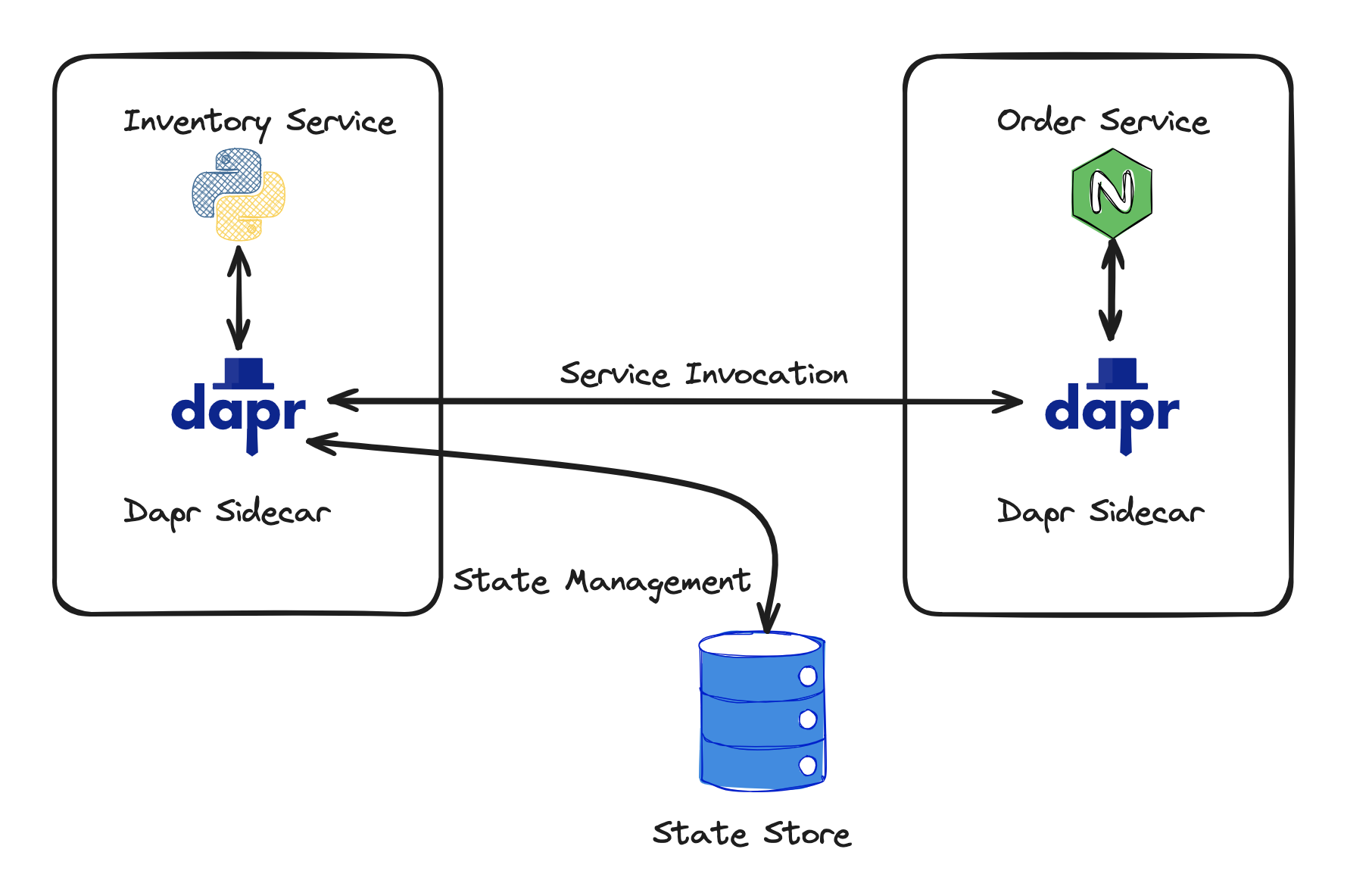
There are two important Dapr ideas in this diagram.
The first is service invocation.
The Order Service does not call the Inventory Service by hard-coded IP address or direct host name. It calls its local Dapr sidecar and asks Dapr to invoke the service with the app ID:
inventory-serviceThe second is state management.
The Inventory Service does not write directly to Redis or another database client. It calls its local Dapr sidecar and asks Dapr to save or retrieve inventory state.
So the two service responsibilities are clear:
Order Service
→ business action: place an order
→ Dapr building block: service invocation

Inventory Service
→ business action: manage stock
→ Dapr building block: state management
This is the point of the example.
The application code stays small and focused. Dapr handles more of the service-to-service and state-management plumbing around it.
How Dapr Fits into This App
The architecture has two services, but Dapr is the layer that changes how those services communicate and store data.
The Order Service still needs to ask the Inventory Service whether stock is available. The Inventory Service still needs somewhere to store inventory quantities.
Dapr does not make those needs disappear.
What Dapr changes is where the infrastructure knowledge lives.
Without Dapr, the Order Service might need to know the direct URL of the Inventory Service:
http://inventory-service-host:5001/inventory/item1It may also need custom retry logic, timeout handling, service discovery, and environment-specific configuration.
With Dapr, the Order Service talks to its own local Dapr sidecar instead:
http://localhost:<dapr-http-port>/v1.0/invoke/inventory-service/method/inventory/item1That may look like just another HTTP call, and in one sense it is.
But the important difference is the boundary.
The Order Service is no longer calling a specific host or IP address for the Inventory Service. It is asking Dapr to invoke a service by app ID:
inventory-serviceThat is what service invocation means here:
One service asks Dapr to call another service by name.The same idea applies to state.
The Inventory Service still saves and reads inventory quantities, but it does not talk directly to Redis or another database client. It talks to its local Dapr sidecar through the Dapr state API.
So the pattern is:
Order Service
→ Dapr service invocation API
→ Inventory Service

Inventory Service
→ Dapr state management API
→ configured state store
Dapr also does not mean there is no operational cost.
You still need the Dapr runtime. You still need sidecars. You still need Dapr components that tell Dapr what state store, pub/sub broker, secret store, or backend to use.
But that cost is usually cheaper than scattering infrastructure glue across every service.
The trade-off is:
Without Dapr
→ each service owns more infrastructure-specific code

With Dapr
→ services use Dapr APIs
→ Dapr components connect those APIs to infrastructure
That is the practical value we are trying to prove in this article.
The code will still make HTTP calls.
But those calls go to Dapr’s local API, not directly to every service or backend dependency.
Set Up the Local Dapr Environment
To run the example locally, we need four things:
Docker
→ runs the local containers Dapr uses behind the scenes

Dapr CLI
→ starts services with Dapr sidecars

Python
→ runs the Inventory Service

Node.js
→ runs the Order Service
The Dapr CLI is the command we will use throughout the walkthrough.
First, check whether it is already installed:
dapr --versionIf Dapr is not installed, install the Dapr CLI.
On Windows PowerShell:
powershell -Command "iwr -useb https://raw.githubusercontent.com/dapr/cli/master/install/install.ps1 | iex"On macOS with Homebrew:
brew install dapr/tap/dapr-cliOn Linux:
wget -q https://raw.githubusercontent.com/dapr/cli/master/install/install.sh -O - | /bin/bashAfter installation, check again:
dapr --versionAt this point, you have the Dapr CLI installed.
But the CLI by itself is only the command-line tool. We still need to initialise the local Dapr runtime.
Run:
dapr initThis prepares your machine for local Dapr development.
It creates the local runtime setup that Dapr uses when you run services in self-hosted mode. For this walkthrough, the important part is that Dapr gives us a local state store we can use without wiring the application directly to a database.
You can check what Dapr started with:
docker psYou should see Dapr-related containers running.
The exact list may vary by Dapr version, but you will commonly see containers for local state/pub-sub support and other Dapr runtime services.
The important point is this:
Dapr CLI installed
→ you can run dapr commands

dapr init completed
→ local Dapr runtime is ready

docker ps shows Dapr containers
→ local support services are running
Once this is ready, we can build the first service: the Inventory Service. It will use Dapr state management to store product quantities without talking directly to the backing state store.
Build the Inventory Service
The Inventory Service is a small Python Flask API.
It will expose endpoints for reading and updating inventory quantities, but it will not talk directly to Redis or a database. Instead, it will call the Dapr state API.
Create the service folder:
mkdir inventory-service
cd inventory-service
Create and activate a Python virtual environment:
python -m venv venv
.\venv\Scripts\Activate.ps1
On macOS or Linux, use:
python3 -m venv venv
source venv/bin/activate
A virtual environment keeps the Python packages for this service separate from the rest of your machine.
Now install the packages:
pip install flask==3.0.3 requestsFlask gives us a small HTTP API. The requests package lets the Inventory Service call its local Dapr sidecar.
Now create a file called inventory_service.py:
from flask import Flask, request, jsonify
import os
import requests

app = Flask(__name__)

DAPR_HTTP_PORT = os.getenv("DAPR_HTTP_PORT", "3500")
DAPR_STATE_STORE_NAME = "statestore"


def get_inventory_quantity(item_id):
    """Fetch the current inventory quantity for an item through Dapr state management."""
    url = f"http://localhost:{DAPR_HTTP_PORT}/v1.0/state/{DAPR_STATE_STORE_NAME}/{item_id}"

    response = requests.get(url)

    if response.status_code == 200 and response.content:
        return response.json()

    return 0


def set_inventory_quantity(item_id, quantity):
    """Save the inventory quantity for an item through Dapr state management."""
    url = f"http://localhost:{DAPR_HTTP_PORT}/v1.0/state/{DAPR_STATE_STORE_NAME}"

    payload = [
        {
            "key": item_id,
            "value": quantity
        }
    ]

    response = requests.post(url, json=payload)

    return response.status_code == 204


@app.route("/inventory/<item_id>", methods=["GET"])
def get_inventory(item_id):
    quantity = get_inventory_quantity(item_id)

    return jsonify({
        "itemId": item_id,
        "quantity": quantity
    })


@app.route("/inventory/<item_id>", methods=["POST"])
def update_inventory(item_id):
    data = request.json or {}
    quantity = data.get("quantity", 0)

    saved = set_inventory_quantity(item_id, quantity)

    if not saved:
        return jsonify({
            "error": "Failed to save inventory quantity"
        }), 500

    return jsonify({
        "itemId": item_id,
        "quantity": quantity
    })


if __name__ == "__main__":
    app.run(host="0.0.0.0", port=5001)
There are two normal Flask endpoints:
GET /inventory/<item_id>
→ returns the current quantity for an item

POST /inventory/<item_id>
→ updates the quantity for an item
The important part is how the service stores and reads data.
The service does not import a Redis client.
It does not know the Redis hostname.
It does not open a database connection.
Instead, it calls the Dapr state API through its local sidecar:
url = f"http://localhost:{DAPR_HTTP_PORT}/v1.0/state/{DAPR_STATE_STORE_NAME}/{item_id}"and:
url = f"http://localhost:{DAPR_HTTP_PORT}/v1.0/state/{DAPR_STATE_STORE_NAME}"The state store name is:
DAPR_STATE_STORE_NAME = "statestore"That name matters because Dapr uses a component called statestore in the local environment created by dapr init.
So the Inventory Service only knows this:
I need to save and read state through Dapr.Dapr handles where that state is stored.
Next, we will run this service with Dapr so it gets its own sidecar.
Run the Inventory Service with Dapr
Now we will run the Inventory Service with its own Dapr sidecar.
Make sure you are still inside the inventory-service folder and that your virtual environment is active:
(venv) PS C:\path\to\inventory-service>Start the Inventory Service with Dapr:
dapr run `
  --app-id inventory-service `
  --app-port 5001 `
  --dapr-http-port 3500 `
  python inventory_service.py
This command starts two things together:
Inventory Service
→ the Python Flask app

Dapr sidecar
→ the local Dapr runtime beside the app
There are three important flags in the command.
--app-id inventory-serviceThis gives the service a Dapr name.
Other services can use this app ID when they want Dapr to invoke the Inventory Service.
--app-port 5001This tells Dapr where the actual Flask app is listening.
In our code, the Flask app starts on port 5001:
app.run(host="0.0.0.0", port=5001)--dapr-http-port 3500This tells Dapr which local HTTP port to use for this service’s sidecar.
Our Python code calls Dapr on that port:
DAPR_HTTP_PORT = os.getenv("DAPR_HTTP_PORT", "3500")So the local relationship is:
Flask app
→ listens on port 5001

Dapr sidecar
→ listens on port 3500

Inventory Service code
→ calls Dapr at localhost:3500

Dapr
→ forwards incoming service invocation requests to the Flask app at port 5001
Keep this terminal open.
The Inventory Service is now running with Dapr. In the next section, we will test state management by adding inventory and reading it back through Dapr.
Test Dapr State Management
The Inventory Service is now running with its Dapr sidecar.
Now let’s test whether it can save and read inventory state.
Open a new terminal window and keep the Inventory Service terminal running.
We will call the service through Dapr, not directly through the Flask app.
Stock item1 with 100 units:
curl.exe -X POST `
  -H "Content-Type: application/json" `
  -d '{\"quantity\": 100}' `
  http://localhost:3500/v1.0/invoke/inventory-service/method/inventory/item1
This request goes to the Dapr sidecar on port 3500.
Dapr then invokes the Inventory Service, which is listening on port 5001.
The request path is:
curl
→ Dapr sidecar on localhost:3500
→ Inventory Service app ID: inventory-service
→ /inventory/item1
→ Inventory Service on port 5001
→ Dapr state API
→ statestore
You should see a response like this:
{
  "itemId": "item1",
  "quantity": 100
}
Now read the inventory value back:
curl.exe `
  http://localhost:3500/v1.0/invoke/inventory-service/method/inventory/item1
You should see:
{
  "itemId": "item1",
  "quantity": 100
}
That proves the first Dapr building block is working.
The Inventory Service saved and retrieved state through Dapr.
The important detail is that the Inventory Service did not talk directly to Redis. It called the Dapr state API using the state store name:
statestoreDapr handled the configured backend behind that name.
So far, we have proved this part of the application:
Inventory Service
→ local Dapr sidecar
→ Dapr state API
→ statestore
Next, we will build the Order Service and use Dapr service invocation to call the Inventory Service.
Build the Order Service
Now that the Inventory Service is running and storing state through Dapr, we can build the second service.
The Order Service is a small Node.js API.
Its job is to:
Receive an order request
Check the available inventory
Reduce the inventory if enough stock exists
Return a success or failure response
The Order Service will not call the Inventory Service directly by host name or IP address.
It will call its own local Dapr sidecar and ask Dapr to invoke the Inventory Service by app ID:
inventory-serviceCreate a new folder for the Order Service.
Open a new terminal window and run:
mkdir order-service
cd order-service
Initialize a Node.js project:
npm init -yInstall the packages:
npm install express axiosExpress gives us a small HTTP API.
Axios lets the Order Service call its local Dapr sidecar.
Now create a file called order_service.js:
const express = require("express");
const axios = require("axios");

const app = express();

app.use(express.json());

const DAPR_HTTP_PORT = process.env.DAPR_HTTP_PORT || "3501";
const INVENTORY_SERVICE = "inventory-service";

app.post("/order", async (req, res) => {
  const { itemId, quantity } = req.body;

  try {
    const inventoryResponse = await axios.get(
      `http://localhost:${DAPR_HTTP_PORT}/v1.0/invoke/${INVENTORY_SERVICE}/method/inventory/${itemId}`
    );

    const available = inventoryResponse.data.quantity || 0;

    if (available < quantity) {
      return res.status(400).json({
        message: `Not enough inventory for item '${itemId}'. Only ${available} units available.`
      });
    }

    const remaining = available - quantity;

    await axios.post(
      `http://localhost:${DAPR_HTTP_PORT}/v1.0/invoke/${INVENTORY_SERVICE}/method/inventory/${itemId}`,
      {
        quantity: remaining
      }
    );

    res.json({
      message: `Order placed for ${quantity} units of item '${itemId}'.`,
      remaining
    });
  } catch (error) {
    console.error("Error processing order:", error.message);

    res.status(500).json({
      message: "Internal error processing order.",
      error: error.message
    });
  }
});

const PORT = process.env.PORT || 5002;

app.listen(PORT, () => {
  console.log(`Order Service running on port ${PORT}`);
});
The important part is the Dapr service invocation URL:
/v1.0/invoke/<app-id>/method/<endpoint>In our code, that becomes:
`http://localhost:${DAPR_HTTP_PORT}/v1.0/invoke/${INVENTORY_SERVICE}/method/inventory/${itemId}`The Order Service is not calling the Inventory Service directly.
It is calling Dapr on its own local sidecar port:
localhost:3501Then it asks Dapr to invoke the app ID:
inventory-serviceand call this endpoint on that service:
/inventory/<item_id>So the request path is:
Order Service
→ local Dapr sidecar on port 3501
→ inventory-service app ID
→ Inventory Service endpoint
The Order Service uses that path twice:
First:
GET inventory quantity

Then:
POST updated inventory quantity
At this point, the Order Service code is ready.
Next, we will run it with Dapr so it gets its own sidecar and can invoke the Inventory Service.
Place an Order End to End
Now both services are running with their own Dapr sidecars.
We already stocked item1 with 100 units when we tested the Inventory Service. Now we will place an order for 10 units.
Open a third terminal window and run:
curl.exe -X POST `
  -H "Content-Type: application/json" `
  -d '{\"itemId\": \"item1\", \"quantity\": 10}' `
  http://localhost:3501/v1.0/invoke/order-service/method/order
This request goes to the Order Service through its Dapr sidecar on port 3501.
The request path is:
curl
→ Order Dapr sidecar on localhost:3501
→ Order Service on port 5002
→ Order Dapr sidecar
→ Inventory Service by app ID: inventory-service
→ Inventory Service checks and updates state through Dapr
If enough stock exists, you should see a response like this:
{
  "message": "Order placed for 10 units of item 'item1'.",
  "remaining": 90
}
Now confirm that the inventory was updated.
Call the Inventory Service again through Dapr:
curl.exe `
  http://localhost:3500/v1.0/invoke/inventory-service/method/inventory/item1
You should see:
{
  "itemId": "item1",
  "quantity": 90
}
That proves the full flow is working.
The Order Service received the order request. It used Dapr service invocation to call the Inventory Service. The Inventory Service used Dapr state management to read and update the inventory quantity.
So the end-to-end path is:
Order request
→ Order Service
→ Dapr service invocation
→ Inventory Service
→ Dapr state management
→ statestore
This is the first complete Dapr application flow in the series.
Stop the Dapr Services
At this point, the application has done its job.
You have tested the Inventory Service, placed an order through the Order Service, and confirmed that the inventory quantity was updated through Dapr state management.
Now you can stop the two running services.
Go back to the terminal running the Order Service and press:
CTRL + CThen go back to the terminal running the Inventory Service and press:
CTRL + CThat stops the application processes and their Dapr sidecars.
If you want to confirm that no Dapr applications are still running, use:
dapr listYou should not see inventory-service or order-service listed as running apps.
The local Dapr support containers created by dapr init, such as Redis and Zipkin, may still be running. That is fine if you plan to continue working with Dapr.
If you want to stop and remove the local Dapr runtime containers as well, run:
dapr uninstallBe careful with this command. It removes the local Dapr runtime setup from your machine. If you want to use Dapr again later, you will need to run:
dapr initagain.
For this walkthrough, the simple cleanup model is:
CTRL + C
→ stops each app and its Dapr sidecar

dapr list
→ checks whether any Dapr apps are still running

dapr uninstall
→ removes the local Dapr runtime containers if you no longer need them
Next, we will step back and capture the hands-on Dapr mental model from what we just built.
The Dapr Hands-On Mental Model
You have now built and tested a small Dapr application.
The application had two services:
Inventory Service
→ Python Flask API
→ stores inventory quantities through Dapr state management

Order Service
→ Node.js API
→ calls Inventory Service through Dapr service invocation
Each service ran as a normal application, but each one also had its own Dapr sidecar.
That is the key pattern:
Your application
→ talks to its local Dapr sidecar

Dapr sidecar
→ handles the distributed-system capability
In this walkthrough, there were a few important Dapr concepts.
The app ID was the Dapr name for each service:
inventory-service
order-service
The app port was where the actual application listened:
Inventory Service
→ app port 5001

Order Service
→ app port 5002
The Dapr HTTP port was where the local sidecar listened:
Inventory Dapr sidecar
→ port 3500

Order Dapr sidecar
→ port 3501
The service invocation URL let one service call another by app ID:
/v1.0/invoke/<app-id>/method/<endpoint>The state store name told Dapr which state component to use:
statestoreSo the complete mental model is:
Application code
→ calls local Dapr API
→ uses a building block
→ Dapr connects to the right service or backend
The Inventory Service did not need to know Redis details.
The Order Service did not need to know the Inventory Service’s direct network location.
Both services used Dapr APIs, and Dapr handled the plumbing around them.
That is the practical value of what you built.
Where This Leads
In this article, we used Dapr in a direct request/response flow.
The Order Service received a request, called the Inventory Service through Dapr service invocation, waited for the response, and then returned the result.
That is the right shape when one service needs an immediate answer:
Can this order be placed?

Is there enough stock?

What quantity remains?
In those cases, the caller needs the answer before it can continue.
But not every workflow needs to work that way.
Sometimes a service does not need to wait for another service to finish its work.
It only needs to say:
Something happened.For example, after an order is placed, other parts of the system may need to react:
Send a confirmation email.
Update analytics.
Start fulfilment.
Notify another system.
The Order Service may not need to call each one directly and wait for them all to finish.
That raises the next design question:
What if a service could announce that something happened,
and other services could react independently?
That is where the next Dapr building block comes in.
In the next article, we will move from direct service invocation to Dapr’s publish/subscribe model.