Securing AKS with Cilium: Layer 4 & 7 Network Policies in Action

Introduction
In the previous article, we installed Cilium in a local Kind cluster and saw how it enforces policies at the kernel level using eBPF. We applied an L3/L4 policy, verified it worked, and compared the experience to Calico. But we stayed at the same layer. The policies controlled which pods could connect, not what they were allowed to do once connected.
This article is where that changes. We’re taking Cilium to the cloud, deploying it on Azure Kubernetes Service (AKS), and using it to enforce Layer 7 policies that filter traffic based on HTTP methods and paths. That’s the capability we’ve been building toward since Article 2.
And because serious infrastructure deserves a little fun, we’ll be doing it with the Star Wars demo, an application built by the Cilium team at Isovalent. You’ll deploy a Death Star service, TIE Fighter pods, and X-Wing pods, then use Cilium policies to control who can connect and what they’re allowed to do once they get there.
We’ll start by setting up an AKS cluster with Cilium and L7 support. Then we’ll deploy the demo, apply an L4 policy, see why it’s not enough, and apply an L7 policy to close the gap. By the end, you’ll have seen the full progression from network-level access control to application-level security.
Let’s start by getting an AKS cluster running with Cilium.
Setting Up AKS with Cilium
Before we can deploy the Star Wars demo, we need an AKS cluster running Cilium. We’ll install open-source Cilium manually using the Cilium CLI rather than Azure’s managed Cilium offering. The managed version locks Layer 7 filtering behind a paid add-on (Advanced Container Networking Services), which adds unnecessary cost for a tutorial. Installing Cilium ourselves gives us full capabilities out of the box.
Prerequisites
Make sure these tools are installed on your machine:
- Azure CLI: Install Azure CLI
- kubectl: Install kubectl
- Cilium CLI:
- macOS:
brew install cilium-cli - Linux/Windows: Cilium CLI installation guide
- macOS:
Note: This tutorial provisions real Azure infrastructure. We’ll show you how to delete the cluster at the end to avoid unexpected charges.
Create the AKS Cluster
First, create a resource group. This is an Azure container that holds all the resources for your cluster:
az group create --name my-resource-group --location eastusNow create the AKS cluster with no default CNI:
az aks create \
  --resource-group my-resource-group \
  --name my-aks-cluster \
  --node-vm-size Standard_B2s \
  --node-count 1 \
  --generate-ssh-keys \
  --network-plugin none \
  --pod-cidr 192.168.0.0/16
Two flags are worth explaining. The --network-plugin none flag prevents Azure from installing its default CNI. This is the same approach we used with Kind in Article 3, where we set disableDefaultCNI: true. It gives Cilium full control over all networking. The --pod-cidr 192.168.0.0/16 defines the IP address range that will be allocated to pods. AKS requires this when using a Bring Your Own CNI setup so the control plane knows how to route traffic to pods.
The remaining flags keep costs low: --node-vm-size Standard_B2s uses a small VM, and --node-count 1 creates a single worker node. The control plane is fully managed by Azure.
This step takes a few minutes. Once it completes, fetch the cluster credentials so kubectl can connect:
az aks get-credentials --resource-group my-resource-group --name my-aks-clusterVerify the cluster is accessible:
kubectl get nodesThe node will show NotReady initially. That’s expected. There’s no CNI installed yet, so the node can’t handle pod networking. It will become Ready once we install Cilium.
Install Cilium
Install Cilium using the Cilium CLI:
cilium install --set azure.resourceGroup=my-resource-groupThe CLI detects the Azure environment automatically and uses Helm under the hood to deploy Cilium with the right configuration for AKS. It installs the Cilium agent (which runs on every node and manages networking, policy enforcement, and traffic inspection) and the Cilium operator (which manages cluster-wide state and coordination).
Wait for the Cilium pods to start:
kubectl -n kube-system get pods --watchOnce the cilium and cilium-operator pods show Running, verify the installation:
cilium statusYou should see Cilium: OK, Operator: OK, and Envoy DaemonSet: OK. Confirm the node is ready:
kubectl get nodesThe node should now show Ready. We’re ready to deploy the Star Wars demo.
The Star Wars Demo
With our AKS cluster running Cilium, we need an application to apply policies to. The Cilium team at Isovalent built a demo specifically for this: a Star Wars-themed set of microservices that gives us trusted pods, untrusted pods, and a service worth protecting.
The demo has three components:
- Deathstar: an HTTP service that exposes an API on port 80, labeled
org=empireandclass=deathstar. This is the service we want to protect. It runs as a deployment with two replicas behind a ClusterIP service. - TIE Fighter: a pod labeled
org=empireandclass=tiefighter. This represents a trusted client. It’s part of the Empire, so it should have access to the Deathstar, but only to specific endpoints. - X-Wing: a pod labeled
org=allianceandclass=xwing. This represents an untrusted client. It’s from the Rebel Alliance, so it should be blocked entirely.
Notice the labels. The TIE Fighter and the Deathstar share org=empire, while the X-Wing has org=alliance. This is how Cilium will distinguish between trusted and untrusted traffic when we apply policies.
Deploy the Application
Deploy the demo using the manifest published by the Cilium project:
kubectl create -f https://raw.githubusercontent.com/cilium/cilium/1.19.2/examples/minikube/http-sw-app.yamlWait for everything to be running:
kubectl get pods,svcYou should see the two Deathstar replicas, the TIE Fighter, and the X-Wing all showing Running, along with the Deathstar service on port 80.
Verify Baseline Connectivity
Right now there are no policies in place. That means all traffic is allowed, which is exactly the open-by-default behavior we’ve been talking about since Article 1. The diagram below shows this state: both the TIE Fighter and the X-Wing can reach the Deathstar freely on TCP port 80.
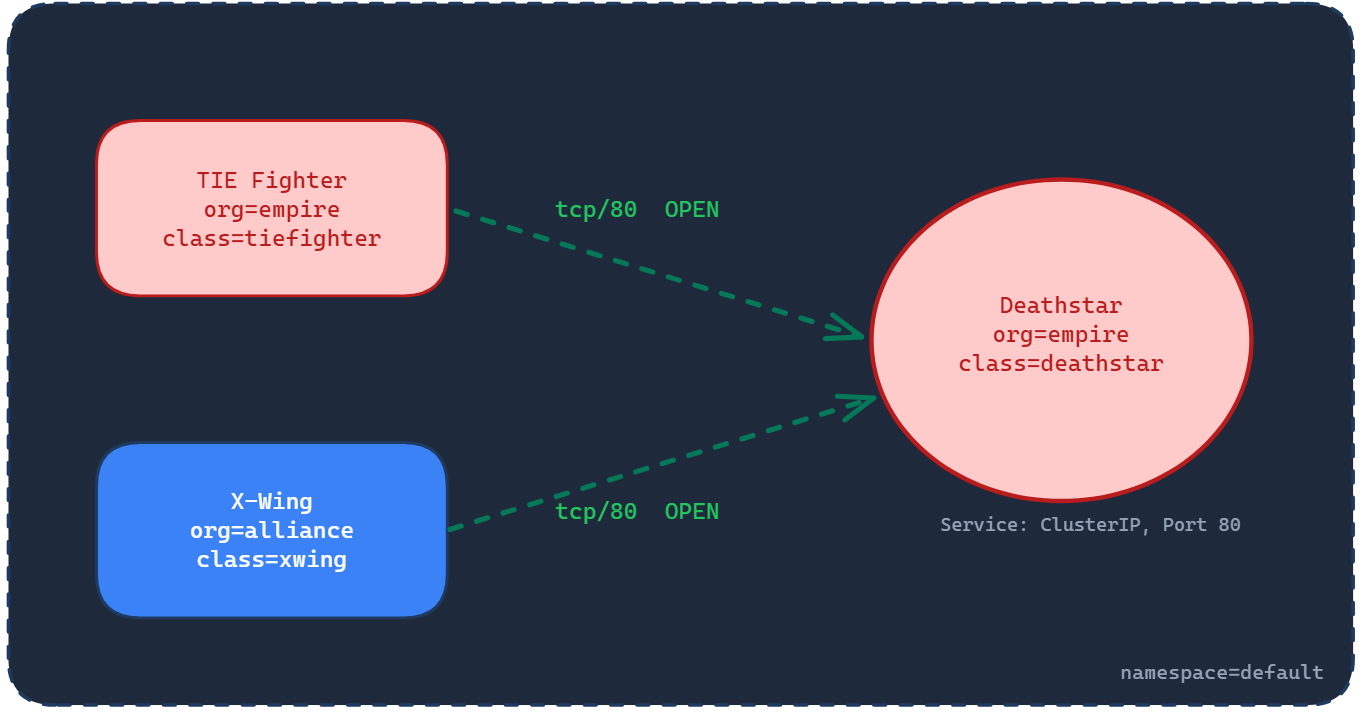
The Deathstar exposes several API endpoints. One of them is /v1/request-landing, which ships use to request permission to land. The -XPOST flag in the curl command specifies the HTTP method, in this case POST. Think of the method as how you’re calling the API, and the path (/v1/request-landing) as where you’re calling it. We’ll come back to this distinction when we get to Layer 7 policies, where it becomes critical.
Let’s test from both pods:
kubectl exec tiefighter -- curl -s -XPOST deathstar.default.svc.cluster.local/v1/request-landingShip landedkubectl exec xwing -- curl -s -XPOST deathstar.default.svc.cluster.local/v1/request-landingShip landedBoth ships can land. The TIE Fighter is part of the Empire, so that’s expected. But the X-Wing is from the Rebel Alliance, and it landed too. In a real system, this would be like an unauthorized service accessing your production database because no access controls are in place.
This is our baseline. In the next section, we’ll apply an L4 policy that uses those org labels to control who can connect to the Deathstar.
Layer 4: Controlling Who Can Connect
Right now, both the TIE Fighter and the X-Wing can reach the Deathstar. We want to change that. Only pods from the Empire (org=empire) should be allowed to connect on TCP port 80. Everything else should be blocked.
This is an L3/L4 policy, the same kind we’ve been working with since Article 2. It filters based on pod identity (labels) and transport-level details (port and protocol). The diagram below shows what we’re about to enforce:
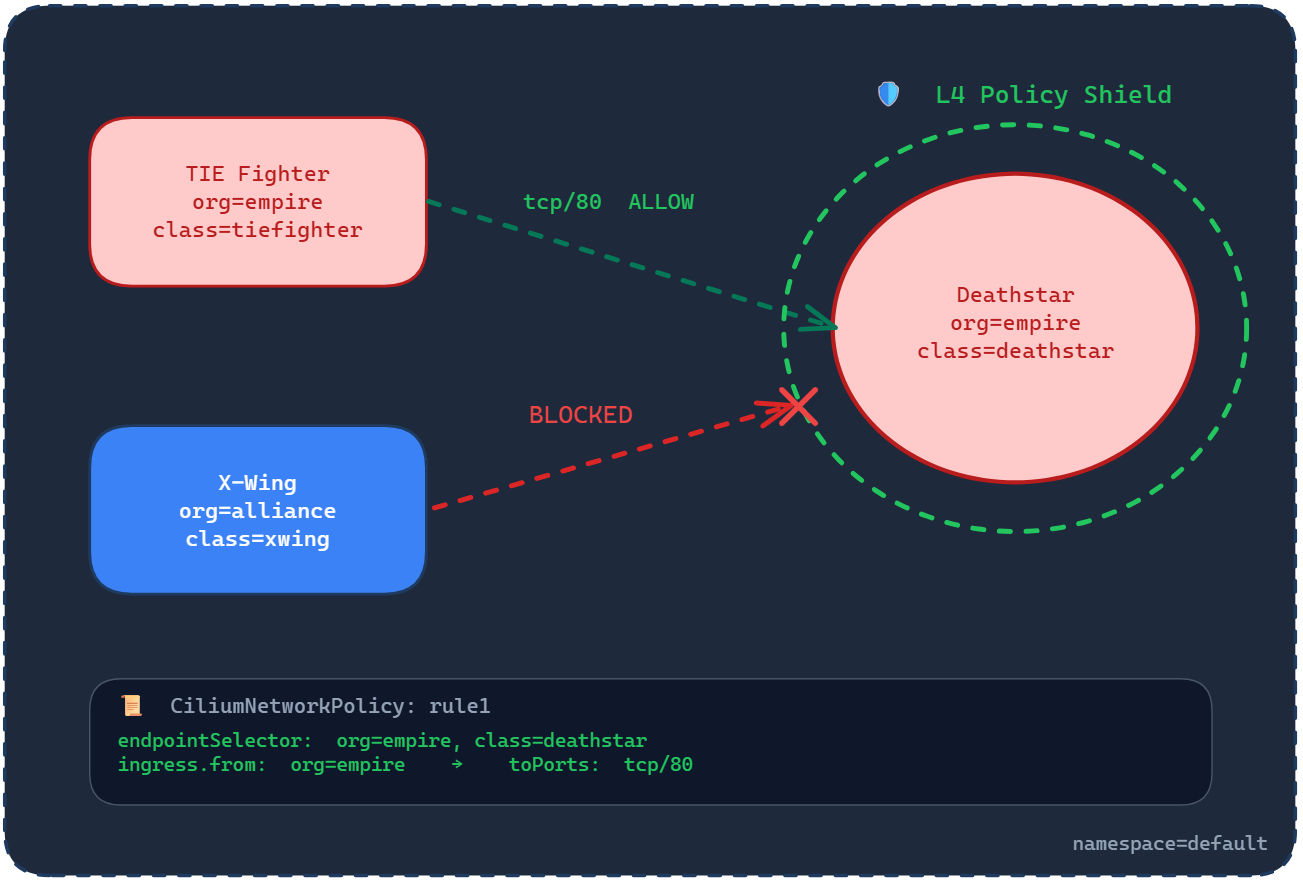
The TIE Fighter, labeled org=empire, is allowed through on TCP port 80. The X-Wing, labeled org=alliance, is blocked. The policy applies to the Deathstar pods, which are selected by the labels org=empire and class=deathstar.
Apply the L4 Policy
Apply the policy directly from the Cilium project’s repository:
kubectl apply -f https://raw.githubusercontent.com/cilium/cilium/1.19.2/examples/minikube/sw_l3_l4_policy.yamlThis creates a CiliumNetworkPolicy called rule1. Here’s what it contains:
apiVersion: "cilium.io/v2"
kind: CiliumNetworkPolicy
metadata:
  name: "rule1"
spec:
  description: "L3-L4 policy to restrict deathstar access to empire ships only"
  endpointSelector:
    matchLabels:
      org: empire
      class: deathstar
  ingress:
    - fromEndpoints:
        - matchLabels:
            org: empire
      toPorts:
        - ports:
            - port: "80"
              protocol: TCP
If you followed Article 3, this structure will look familiar. The endpointSelector targets the Deathstar pods using two labels: org=empire and class=deathstar. The ingress block allows traffic only from pods labeled org=empire, on TCP port 80. Everything else is denied by the implicit deny rule we covered in Article 2.
Test the Policy
First, test from the TIE Fighter. This should succeed because the TIE Fighter carries the org=empire label:
kubectl exec tiefighter -- curl -s -XPOST deathstar.default.svc.cluster.local/v1/request-landingShip landedThe TIE Fighter can still land. Now test from the X-Wing:
kubectl exec xwing -- curl -s -XPOST deathstar.default.svc.cluster.local/v1/request-landingThis should hang and eventually time out. The X-Wing carries org=alliance, which doesn’t match the policy’s allowed label. Cilium drops the traffic at the kernel level before it reaches the Deathstar.
The L4 Policy Works, But There’s a Gap
The L4 policy does its job. Untrusted pods are blocked. Only Empire ships can connect. But here’s something the L4 policy can’t protect against.
The Deathstar doesn’t just expose /v1/request-landing. It also exposes /v1/exhaust-port, a dangerous endpoint that, if called, causes catastrophic failure. Let’s see what happens when the TIE Fighter, a trusted Empire pod that passed our L4 policy, calls it:
kubectl exec tiefighter -- curl -s -XPUT deathstar.default.svc.cluster.local/v1/exhaust-portPanic: deathstar exploded
goroutine 1 [running]:
main.HandleGarbage(0x2080c3f50, 0x2, 0x4, 0x425c0, 0x5, 0xa)
/code/src/github.com/empire/deathstar/
temp/main.go:9 +0x64
main.main()
/code/src/github.com/empire/deathstar/
temp/main.go:5 +0x85The Deathstar exploded. A trusted pod, one that our L4 policy explicitly allowed, just destroyed the service by calling a different API endpoint.
This is the limitation of L3/L4 policies. They control who can connect, but not what they can do once connected. The TIE Fighter is allowed to reach the Deathstar on port 80, and from the L4 policy’s perspective, that’s all that matters. It can’t distinguish between a POST to /v1/request-landing (safe) and a PUT to /v1/exhaust-port (catastrophic).
In a real system, this is the difference between a frontend service making legitimate API calls and that same service accidentally (or maliciously) hitting an admin endpoint that drops your database.
This is exactly the gap that Layer 7 filtering closes. In the next section, we’ll apply an L7 policy that controls not just who can connect, but which HTTP methods and paths they’re allowed to use.
Layer 7: Controlling What They Can Do
The L4 policy controls who can connect. But as we just saw, a trusted pod can still cause damage by calling the wrong endpoint. We need to go deeper and control not just who connects, but what they’re allowed to do once connected.
This is Layer 7 filtering. Instead of stopping at the transport layer (IPs, labels, ports, protocols), Cilium inspects the HTTP traffic itself and makes decisions based on the request method and path. Remember from the baseline tests: the method is how you call the API (POST, PUT, GET), and the path is where you call it (/v1/request-landing, /v1/exhaust-port).
The diagram below shows what we’re about to enforce:
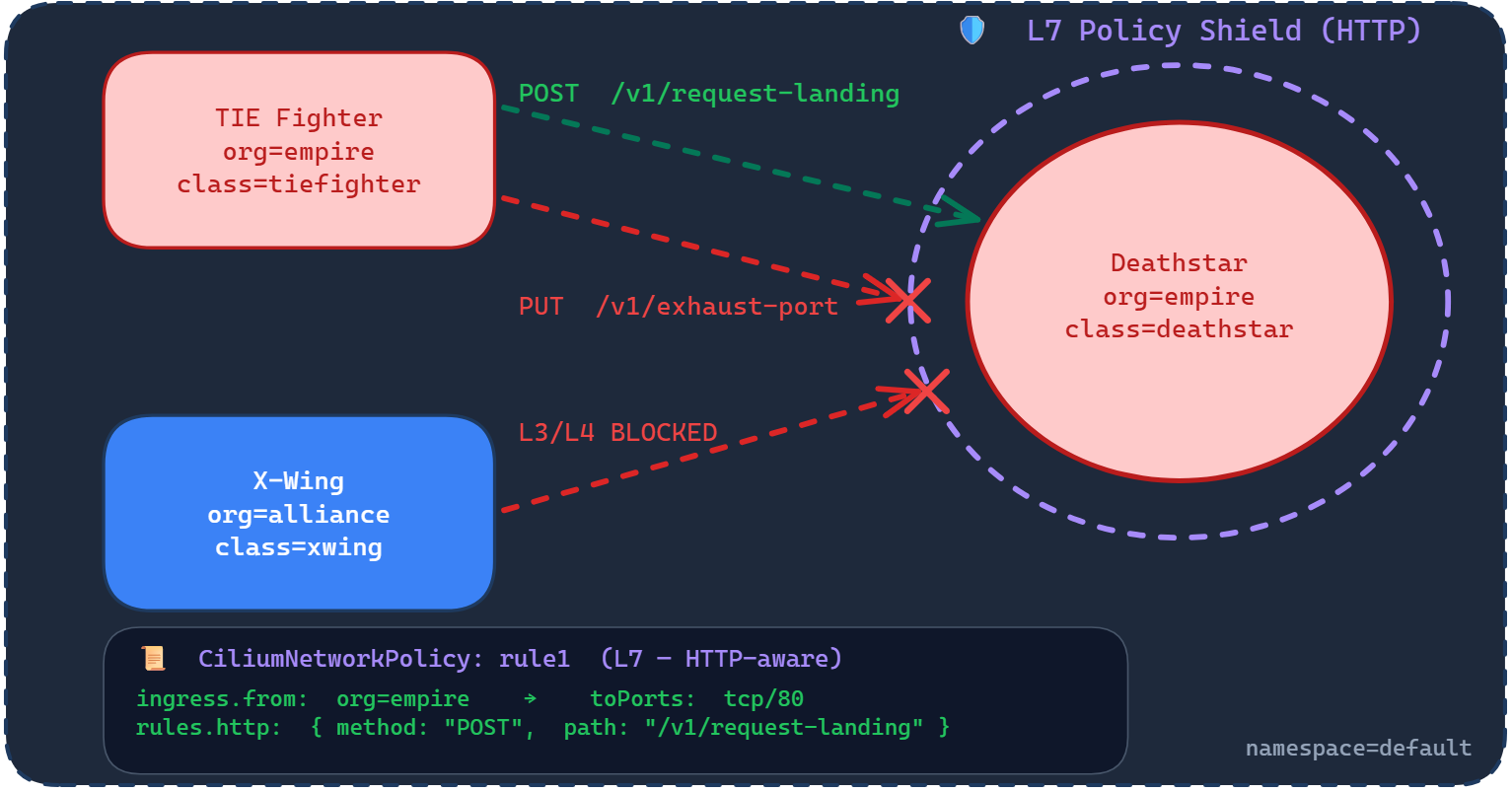
Three things are happening in this diagram. The X-Wing is still blocked at L3/L4, same as before. The TIE Fighter is allowed to POST /v1/request-landing, that’s the safe endpoint. But the TIE Fighter is blocked from calling PUT /v1/exhaust-port, even though it’s a trusted Empire pod connecting on the same port. The L7 policy shield wraps around the Deathstar and inspects the contents of every request, not just the source and destination.
Apply the L7 Policy
Apply the updated policy from the Cilium project’s repository:
kubectl apply -f https://raw.githubusercontent.com/cilium/cilium/1.19.2/examples/minikube/sw_l3_l4_l7_policy.yamlThis updates the existing rule1 policy. Here’s what the updated policy contains:
apiVersion: "cilium.io/v2"
kind: CiliumNetworkPolicy
metadata:
  name: "rule1"
spec:
  description: "L7 policy to restrict access to specific HTTP call"
  endpointSelector:
    matchLabels:
      org: empire
      class: deathstar
  ingress:
    - fromEndpoints:
        - matchLabels:
            org: empire
      toPorts:
        - ports:
            - port: "80"
              protocol: TCP
          rules:
            http:
              - method: "POST"
                path: "/v1/request-landing"
Compare this to the L4 policy we applied earlier. The endpointSelector, fromEndpoints, and toPorts are all the same. The only addition is the rules block nested under toPorts. This is where L7 filtering happens.
The rules.http section says: on this port, only allow HTTP requests that match POST as the method and /v1/request-landing as the path. Any other combination, a PUT to the same path, a POST to a different path, or a PUT to /v1/exhaust-port, is denied. The L4 policy let the TIE Fighter through the door. The L7 policy controls what it can do inside.
Test the L7 Policy
First, test the safe endpoint. The TIE Fighter should still be able to request landing:
kubectl exec tiefighter -- curl -s -XPOST deathstar.default.svc.cluster.local/v1/request-landingShip landedThe TIE Fighter can still land. Now test the dangerous endpoint that blew up the Deathstar earlier:
kubectl exec tiefighter -- curl -s -XPUT deathstar.default.svc.cluster.local/v1/exhaust-portAccess deniedThe same pod, the same port, the same service. But this time the request is denied. Cilium inspected the HTTP request, saw that PUT /v1/exhaust-port doesn’t match the allowed method and path, and blocked it. The Deathstar is still standing.
And the X-Wing is still blocked at L3/L4, just as before:
kubectl exec xwing -- curl -s -XPOST deathstar.default.svc.cluster.local/v1/request-landingThis will hang and time out. The L7 policy builds on top of the L4 rules, it doesn’t replace them. Untrusted pods are still blocked entirely.
What Just Happened
This is the full picture of what Cilium’s policy engine does:
- At Layer 3/4, Cilium checks the pod identity and the port. The X-Wing is blocked here because it carries
org=alliance. It never gets past this point. - At Layer 7, Cilium inspects the HTTP request itself. The TIE Fighter passes the L3/L4 check (it has
org=empireand is connecting on port 80), but its request is then inspected for method and path.POST /v1/request-landingis allowed.PUT /v1/exhaust-portis denied.
This is what we’ve been building toward across the entire series. Article 1 gave us the flat network where everything connects. Article 2 introduced policies that control who connects. Article 3 showed us the eBPF engine that makes kernel-level enforcement possible. And this article shows what that engine actually unlocks: security that understands your application’s API, not just its network address.
In a production environment, this translates directly. A frontend service might be allowed to call GET /api/orders but blocked from calling DELETE /api/orders. A monitoring pod might read metrics but not write configuration. The network policy doesn’t just control connectivity anymore. It enforces the contract between services at the API level.
Clean Up
To avoid unnecessary Azure charges, delete the cluster and resource group:
az aks delete --resource-group my-resource-group --name my-aks-cluster --yes --no-wait

az group delete --name my-resource-group --yes --no-wait
The --no-wait flag lets the deletion run in the background so you don’t have to wait for it to complete.
Conclusion
This article brought together everything the series has been building toward.
We started with the flat network model in Article 1, where every pod could reach every other pod. Article 2 introduced Network Policies to control who can connect. Article 3 replaced iptables with Cilium’s eBPF engine, moving policy enforcement into the kernel. And in this article, we saw what that engine actually unlocks.
Layer 4 policies controlled which pods could connect to the Deathstar based on labels and ports. That blocked the X-Wing entirely. But it couldn’t stop the TIE Fighter from calling a dangerous endpoint on the same port. Layer 7 policies closed that gap by inspecting the HTTP request itself, allowing POST /v1/request-landing while blocking PUT /v1/exhaust-port from the same trusted pod.
That’s the progression from network-level access control to application-level security. Your policies don’t just control connectivity anymore. They enforce the contract between services at the API level, and they do it at the kernel level through eBPF.
So far, everything we’ve covered has been about traffic moving between services inside the cluster. That’s east-west traffic. But in any real application, traffic also needs to enter the cluster from the outside: users hitting your API, browsers loading your frontend, external services calling your endpoints. That’s north-south traffic, and it’s where ingress controllers come in.
In the next article, we’ll look at how Cilium handles ingress using the same eBPF and Envoy foundation we’ve been working with, and why that matters compared to running a separate ingress controller like NGINX or Traefik.